Google calls Gemini 4 Argon its model for your “hardest problems,” and people have been asking the same question ever since: how do you actually use it? The answer depends on who you are, and for most people it starts with a paid plan.
Google first announced Argon on September 30, 2026, with limited access, then made it globally available on October 13. It’s the first model in the Gemini 4 family, built for long, complex work in coding, finance, law, cybersecurity, and science.
Below, we cover every way to access Argon, what it costs, and how it compares with one of its closest rivals, Claude Opus 5.5. One date matters if you’re a developer: Argon’s API price doubles after November 30, 2026.
How to Access Gemini 4 Argon
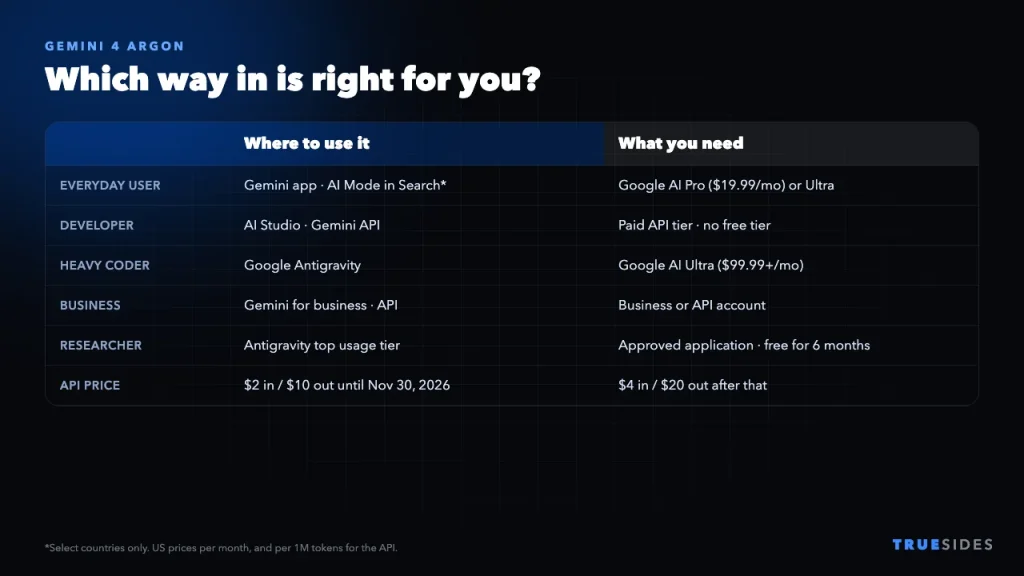
|
If you are… |
Where to use it |
What you need |
|
An everyday user |
Gemini app and AI Mode in Search |
Google AI Pro or Ultra |
|
A developer |
AI Studio, Android Studio, and the Gemini API |
Gemini API paid tier |
|
A heavy coder |
Google Antigravity |
Google AI Ultra |
|
A business |
Gemini for business, the API, and Antigravity |
A business or API account |
|
A scientist or researcher |
Antigravity’s highest usage tier |
A successful application (free for 6 months) |
|
A cybersecurity defender |
Argon without cyber guardrails |
Acceptance into the Fairwind Program |
In the Gemini app
This is the simplest option for most people. Google says Google AI Pro and Ultra subscribers can use Argon in the app.
- Sign in to the Gemini app with the Google account that has your subscription.
- If you don’t have a plan yet, choose AI Pro or AI Ultra.
- Open the model picker in the chat window and select Gemini 4 Argon. Labels can change, and availability may roll out gradually.
In AI Mode in Search
Pro and Ultra subscribers can also use Argon in AI Mode, but only in selected countries. If you don’t see it, check Google’s country list on the subscriptions page before assuming something is wrong with your account.
Through the Gemini API
Developers can create a key in Google AI Studio and call the model ID gemini-4-argon. You’ll need billing enabled, because there’s no free API tier. Computing for Geeks reports that its free-tier key hit a quota limit of zero. Enterprises can also reach Argon through Google Cloud.
In Google Antigravity
Antigravity is Google’s agentic coding platform, and Google AI Ultra subscribers can use Argon there. Google has also added Antigravity’s coding interface to the Gemini macOS app, so you can move between chatting and coding in one place.
Can you use Gemini 4 Argon for free? For most people, no. Google’s launch post lists no free option for everyday users or the API. The exception is the application program for scientists and researchers, which offers free Antigravity access for six months, subject to eligibility and capacity.
How Much Does Gemini 4 Argon Cost?
Subscription plans
Prices here are for the US, based on Google’s subscriptions page and other reporting at the time of writing. They can vary by country.
|
Plan |
US price |
Argon access |
|
Google AI Pro |
$19.99 a month |
Gemini app and AI Mode |
|
Google AI Ultra |
$99.99 a month |
Higher limits (5x AI Pro), plus Antigravity |
|
Google AI Ultra (top tier) |
$199.99 a month |
Highest limits (20x AI Pro), plus Antigravity |
API pricing
|
Per 1M tokens |
Through November 30, 2026 |
From December 1, 2026 |
|
Input |
$2 |
$4 |
|
Output |
$10 |
$20 |
|
Cached input |
$0.10 |
$0.20 |
Here’s what that looks like in practice: a job using 1 million input tokens and 200,000 output tokens costs $4 at the introductory rate and $8 at the standard rate. Don’t forget that output includes the model’s long responses, so heavy tasks can add up quickly.
What Gemini 4 Argon Is Good At
- Very long inputs. Argon has a 1 million token limit shared between input and output, which is roughly 1,500 pages of text, according to Artificial Analysis.
- Complex documents. Google says Argon can read long files that mix text, tables, charts, and images, then turn them into one structured answer.
- Long coding projects. Google says Argon helped its Chrome team finish a refactor across hundreds of files, completing months of work in weeks. That’s Google’s own account, so treat it as a best case.
- Clearer writing. Google says Argon gives more direct answers with less hedging and repetition, and follows style instructions better than earlier Gemini models.
If you’re trying to understand how Google’s AI products fit together, our guides to Gemini vs Google Assistant and NotebookLM are a good place to start.
Gemini 4 Argon vs Claude Opus 5.5
Claude Opus 5.5, from Anthropic, is one of Argon’s closest competitors, and neither one wins everywhere. Here’s how they compare according to a roundup by NeuralTrust:
|
|
Gemini 4 Argon |
Claude Opus 5.5 |
|
API price per 1M tokens |
$2 / $10 until Nov 30, then $4 / $20 |
$4 / $20 |
|
Context window |
1,048,576 tokens, shared |
1M tokens |
|
Default output limit |
65,536 tokens (about 1M with long decode) |
128K tokens |
|
GraphWalks (long context) |
84.2% |
66.8% |
|
Terminal-Bench 4.0 (coding in a terminal) |
57.4% |
66.4% |
|
Prompt injection attack success (lower is better) |
0.7% |
1.0% |
Be careful with those benchmark numbers. They come from Google’s own table, and NeuralTrust notes that Anthropic reports different scores for some Opus 5.5 results. Google’s table puts Argon ahead on 14 of the 18 rows where both have scores, mostly in knowledge work and long-context tasks.
Independent results are less kind to Argon. On the Artificial Analysis Intelligence Index, Argon at its High setting currently scores 50, while Opus 5.5 at its Max setting scores 59. And while Google said Argon ranked first on the Vals Index at launch, Vals’s own page has more recently listed it fourth of 32 models. Rankings move quickly, so check for yourself before relying on any one number.
A simple way to choose: Try Argon first for very long documents and for lower API costs before November 30. Try Opus 5.5 first for terminal-heavy coding agents. If the work matters, run your own task through both, since benchmarks rarely match your real workload.
Downsides to Know About
- It can be slow. Artificial Analysis measured about 38 seconds to the first answer at the High setting, and rated it notably slow per task.
- The price is about to rise. Plan your budget around $4 and $20 per million tokens, not the introductory rate.
- Early impressions vary. Reviewers have praised Argon’s strength on big tasks, but the hands-on comparisons we read don’t agree on which model produces the most polished results.
- It costs money to try. Unlike many Gemini models, it has no free API tier.
Should You Pay for Gemini 4 Argon?
It’s probably worth it if…
- You regularly work through long contracts, reports, research papers, or big codebases.
- You already pay for Google AI Pro and can simply start using it.
- You’re a developer who can test it at the lower rate before November 30.
You can probably skip it if…
- You mostly use AI for quick questions, emails, and summaries.
- You’d need to subscribe just to see what the fuss is about, and free tools already do what you need.
- Speed matters more to you than depth.
If you’re watching your monthly bills, it’s worth checking subscriptions you already have before adding another. Our guide to iCloud charges shows how a small monthly fee can quietly grow.
Final Thoughts
Gemini 4 Argon is a serious model, especially for long, complicated work, but it’s not something most people can try for free. Everyday users need Google AI Pro or Ultra, and developers need the paid API tier. If you’re a developer, testing it before November 30 will cost half as much. For everyone else, $19.99 a month is only worth it if you’ll really use that extra depth.