For the past few years, the advice was simple: don’t buy a PC with 8GB of RAM. Then memory prices soared, 8GB laptops came back, and Microsoft started calling 8GB “a great fit” for many people. So who’s right? The honest answer is that 8GB is enough for light use, and not much more.
The timing isn’t a coincidence. AI demand has driven up the price of memory, which TechRadar says has pushed laptop makers toward 8GB models to keep prices down. On November 3, 2026, Microsoft published a post explaining how it has made Windows 11 run better on these machines.
We compared Microsoft’s claims with hands-on tests to see what 8GB can really do today, and when it’s worth paying more.
Is 8GB of RAM Enough? Quick Answer
|
What you do |
Is 8GB enough? |
|
Web browsing, email, and streaming |
Yes |
|
Word, Excel, and school work |
Yes, if you don’t keep too much open |
|
Video calls while multitasking |
Usually, but it can get tight |
|
Light photo editing |
Possible, with fewer apps open |
|
Older or lighter games |
Often yes |
|
New AAA games |
No, buy 16GB |
|
Video editing, 3D, and big data work |
No, buy 16GB or more |
What Microsoft Is Claiming
In its November 3 blog post, Windows chief Pavan Davuluri wrote that “for many people, 8 GB is a great fit for the things they do every day.” Microsoft’s numbers for 8GB PCs include:
- Up to 20% more responsive when opening Start, Search, Settings, and File Explorer.
- Up to 40% faster multitasking in one lab test, compared with January 2026 builds.
- Up to 900MB less memory growth in multitasking tests across Windows, Edge, and Microsoft 365.
Those are “up to” figures from Microsoft itself, and its footnotes say the 40% result is specific to one scenario on one laptop. They’re still a real sign of progress, but they don’t tell you how your PC will feel. Microsoft also says that demanding work such as 3D modeling or advanced video editing benefits from 16GB or more.
It’s worth noting that Microsoft has a reason to say this. The same post promotes 8GB Windows laptops from $429 for the holidays. As Windows Latest points out, this is the same company that made 16GB the minimum for Copilot+ PCs.
What Real-World Tests Show
Independent testers have reached different conclusions, and their results show how much your usage matters.
The optimistic result
Windows Central tested an older Core i5-10400 desktop with one 8GB stick of slow DDR4 RAM. With 10 Edge tabs open, including 4K YouTube and Netflix, memory peaked at about 6.6GB. Adding GIMP, Spotify, and Word brought it to around 7GB. Its verdict was that, within reason, 8GB is “not only viable but quite enjoyable.” It didn’t test heavy gaming or specialized apps.
The pessimistic result
MakeUseOf had a very different experience on a Ryzen 5 5600 desktop. With just three Chrome tabs plus Slack and Spotify, usage reached 7.4GB of 7.9GB, and opening Gmail in a fourth tab caused lag. The writer doesn’t recommend buying an 8GB PC in 2026, although Rainbow Six Siege ran surprisingly well with everything else closed.
Windows itself is improving
Windows Latest measured an 8GB laptop using 5GB of memory after a restart on Windows 11 25H2, and 3.3GB after updating to 26H2. That’s just one laptop, but it does suggest the update is worth having. Our guide on whether Windows 11 26H2 is safe to install explains how to get it.
Why did these tests disagree? The test apps were different. Windows Central used Edge, while MakeUseOf used Chrome, Slack, and Spotify, and both used older desktops rather than new 8GB laptops. Apps, browser, tabs, and even background software can matter as much as the amount of RAM.
Is 8GB of RAM Enough for Gaming?
For modern games, generally no. TechSpot’s testing found that Black Myth: Wukong was very poor on 8GB, with frequent stutters, while performance on 16GB, 32GB, and 64GB was largely the same. Borderlands 4 also had weak 1% lows on 8GB but ran fine on 16GB.
That matches what MakeUseOf saw: a lighter multiplayer game can run fine if you close everything else. But if you’re buying a PC mainly to play new AAA games, treat 16GB as your starting point. Also, don’t confuse system RAM with VRAM, the separate memory on your graphics card. Your GPU matters too, and our RTX 4070 Super guide is a useful reference if you’re shopping for one.
8GB vs 16GB: Is the Upgrade Worth the Money?
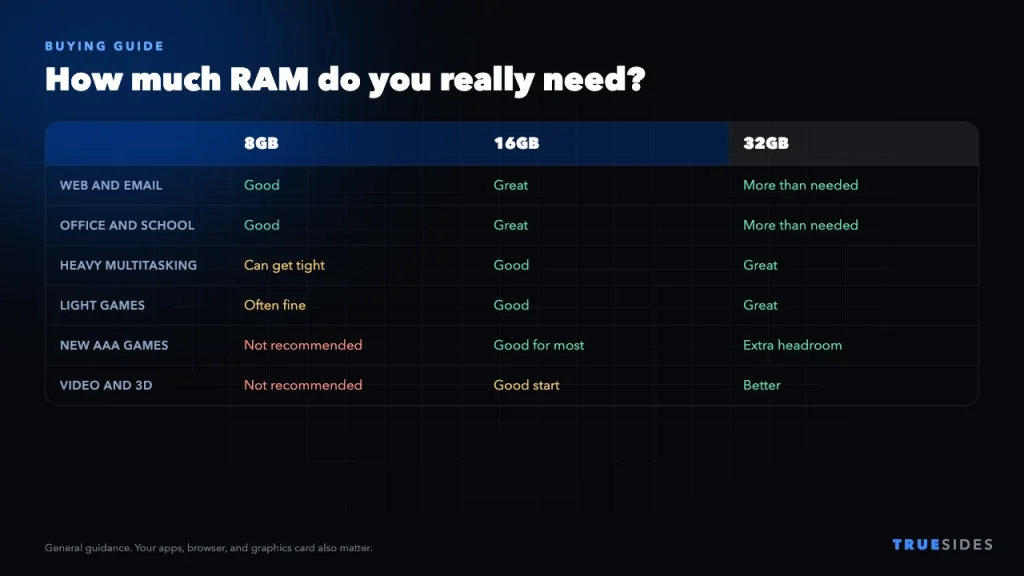
High memory prices make this harder than it used to be. Windows Latest notes that the 13-inch Surface Laptop costs $949.99 with 8GB and $1,149.99 with 16GB, a $200 difference. Some forecasts don’t expect prices to return to normal until late 2027 or later, though forecasts like that can be wrong.
Buy 8GB if…
- Your budget is tight, and you mainly browse, stream, and use office apps.
- It’s a second PC, or for a child or relative with simple needs.
- The PC has a free memory slot, so you can add more when prices fall.
Buy 16GB if…
- You usually keep lots of tabs and apps open at the same time.
- You play modern games, edit photos or video, or code.
- You plan to keep the PC for four or five years.
- The RAM is soldered, which means you can’t upgrade it later.
Check this before you buy: Look for “soldered” or “onboard” memory in the specs. An 8GB laptop with soldered RAM will always be an 8GB laptop. Windows Latest notes that the $429 Lenovo that Microsoft promotes is listed with two memory slots, which is a better position to be in.
How to Get More From a PC With 8GB of RAM
Already have 8GB? Try these before you spend any money.
- Update Windows. Microsoft says you need version 26H2, build 26300.9818 or later, for its latest improvements. Update Edge, Microsoft 365, and Teams too.
- Turn off startup apps. Go to Settings > Apps > Startup and disable anything you don’t need.
- Close what you’re not using. Chat apps and browsers are often the biggest memory users.
- Use sleeping tabs. Microsoft says Edge now puts inactive tabs to sleep after 15 minutes by default.
- Check your storage. When memory fills up, Windows moves data to your drive, so an SSD with free space helps a lot.
- Check whether you can upgrade. Open Task Manager > Performance > Memory to see your RAM speed and how many slots are in use.
Don’t panic if Task Manager shows that most of your memory is in use. Microsoft explains that this doesn’t necessarily mean your PC is under pressure, since Windows keeps useful data ready in spare memory. The real warning sign is lag: apps that take a while to reload when you switch back to them. For more help, see our guide on what to do when your computer is running slow.
Final Thoughts
8GB of RAM has become acceptable again for light use, helped by real improvements in Windows 11, but that’s not the same as being a good long-term choice. If you only browse, stream, and write documents, you can save money with 8GB. For gaming, creative work, heavy multitasking, or a PC you’ll keep for years, 16GB is still the safer buy, especially if the memory is soldered. If you can’t afford 16GB today, choose an 8GB PC with a free memory slot so you can upgrade later.