
Valve finally shipped its new VR headset, and it’s not what most people expected. The Steam Frame is a standalone headset that runs SteamOS, streams PC VR with eye-tracked foveation, and costs $1,059. The Meta Quest 3, meanwhile, is still the default VR headset for most people at $599.99. So which one is worth your money?
Valve announced the Steam Frame on November 12, 2025, opened reservations on September 14, 2026, and released it on September 18, 2026. It arrives at a strange time: memory prices have pushed up the cost of nearly every headset, Meta raised the Quest 3’s price earlier this year, and PC VR players have been waiting years for a Valve Index successor.
We’ve gone through the confirmed specs, early reviews, and pricing to compare these two headsets on everything that matters: price, comfort, displays, PC VR, standalone games, and mixed reality.
Steam Frame vs Quest 3: Quick Verdict
|
If you… |
Buy this |
|
Mostly play PC VR from your Steam library |
Steam Frame |
|
Want the best value and the biggest standalone library |
Meta Quest 3 |
|
Care about mixed reality and color passthrough |
Meta Quest 3 |
|
Want eye tracking and the sharpest wireless PC streaming |
Steam Frame |
|
Are buying your first VR headset |
Meta Quest 3 (or Quest 3S) |
The short version: the Steam Frame is a PC-first headset that can also work standalone, while the Quest 3 is a standalone-first headset that can also play PC VR. They come at the same idea from opposite ends.
Price: The Biggest Difference
There’s no getting around it: the Steam Frame is expensive.
- Steam Frame (256GB): $1,059
- Steam Frame (1TB): $1,299
- Meta Quest 3 (512GB): $599.99
- Meta Quest 3S: $349.99 (128GB) or $449.99 (256GB)
Both companies blame the same thing. In February 2026, Valve delayed announcing the Steam Frame’s final price because of a global memory shortage, warning that it would cost more than planned. In April, Meta raised the Quest 3 by $100 to $599.99, saying in its pricing update that “the global surge in the price of critical components — specifically memory chips — is impacting almost every category of consumer electronics, including VR.”
Valve does soften the blow a little. Every Steam Frame includes its controllers, a Wi-Fi 6E USB adapter for a dedicated PC link, and a copy of Half-Life: Alyx. If you already own Alyx, though, that bundle is worth less to you.
Value check: For the price of one 256GB Steam Frame, you could buy a Quest 3 and still have about $460 left, or buy three Quest 3S headsets. The Steam Frame has to earn that premium through comfort, display quality, and PC streaming.
Specs Compared
|
Spec |
Valve Steam Frame |
Meta Quest 3 |
|
Chip |
Snapdragon 8 Gen 3 |
Snapdragon XR2 Gen 2 |
|
RAM |
16GB LPDDR5X |
8GB |
|
Storage |
256GB or 1TB + microSD slot |
512GB |
|
Display |
2160 × 2160 LCD per eye |
2064 × 2208 LCD per eye |
|
Lenses |
Pancake |
Pancake |
|
Refresh rate |
72–144Hz (144Hz experimental) |
Up to 120Hz |
|
Eye tracking |
Yes |
No |
|
Passthrough |
Monochrome tracking cameras |
Full-color mixed reality |
|
Weight |
185g core / 440g with strap |
515g |
|
Wireless |
Wi-Fi 7 + bundled Wi-Fi 6E PC adapter |
Wi-Fi 6E |
|
OS |
SteamOS |
Horizon OS |
|
Price |
$1,059 / $1,299 |
$599.99 |
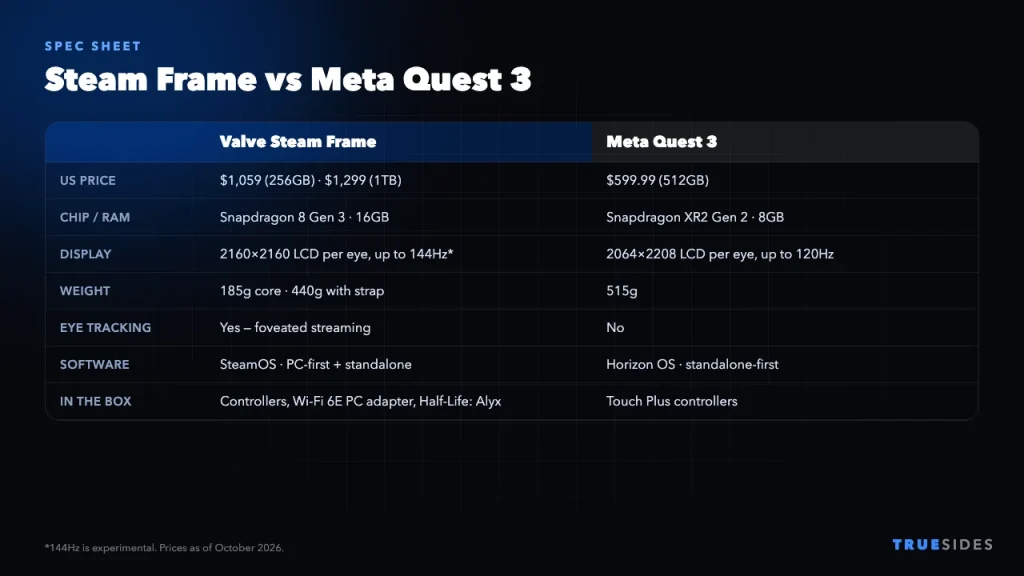
On paper, the Steam Frame is the more powerful headset. It has double the RAM, a newer phone-class chip, a slightly higher pixel count per eye, and eye tracking, which the Quest 3 lacks entirely.
Comfort and Design
This is where the Steam Frame surprised people. The core module, which holds the displays, lenses, and chip, weighs just 185 grams. With the head strap, facial interface, and battery, the whole headset comes to about 440 grams. That’s still noticeably lighter than the Quest 3’s 515 grams.
More importantly, the weight is spread out. Ars Technica found the Steam Frame felt “more balanced and less front-heavy” than competing headsets, and Engadget called it “very comfortable.” If you’ve ever ended a long Quest session with a sore face or neck, that difference matters.
The trade-offs are elsewhere. Engadget criticized the Steam Frame’s “poor quality” speakers and “limited battery life.” Its 21.6Wh battery charges over USB-C at up to 45W, but plan on keeping a cable or power bank nearby for long sessions.
PC VR Streaming: Steam Frame’s Biggest Strength
Valve built the Steam Frame for people with a gaming PC. Two features make it stand out.
Foveated streaming
The Steam Frame uses its eye tracking for what Valve calls foveated streaming. Your PC sends the most detail to the spot you’re actually looking at and less to your peripheral vision. Because your eyes can’t see fine detail at the edges anyway, you get a sharper-looking image from the same Wi-Fi bandwidth.
A dedicated wireless link
The bundled Wi-Fi 6E USB adapter plugs into your PC and creates a direct link to the headset, so you don’t have to rely on your home router. Router problems cause a lot of wireless VR stutter, so this is a real advantage. If you stream VR on any headset, our guide to the best rated routers for home can still help.
The Quest 3 does PC VR too, through Air Link, a USB-C cable, or third-party apps like Virtual Desktop, and it works well for most people. But Meta treats PC VR as a bonus, not the main event. Without eye tracking, the Quest 3 can’t do foveated streaming.
Standalone Games and Apps
Here the Quest 3 is far ahead, and it’s not close.
The Quest 3 has the largest library of native standalone VR games of any headset. Thousands of titles run directly on the device, and most VR developers ship on Quest first.
The Steam Frame runs SteamOS, the same Linux-based OS as the Steam Deck. It can run VR and non-VR games, and it uses compatibility layers to stretch its library:
- Proton to run Windows games, just like on the Steam Deck.
- FEX to emulate x86 PC code on the headset’s ARM chip.
- Lepton to sideload Android apps (APKs).
That flexibility is impressive, but reviewers say it’s inconsistent. Running PC games through emulation on a mobile chip doesn’t always work smoothly. At launch, Valve’s “Great on Frame” verification program covered only a few dozen SteamVR titles, according to Ars Technica. Valve’s port of Half-Life: Alyx was praised for having “relatively few compromises,” though.
The library question in one line: If you want to play a game without a PC, the Quest 3 probably runs it. If you want to play a game with a PC, the Steam Frame probably streams it better.
Mixed Reality and Passthrough
The Quest 3 has full-color passthrough cameras, so you can see your room clearly and play mixed reality games that put virtual objects on your real table or walls. It’s one of the Quest 3’s best features.
The Steam Frame uses four monochrome cameras for tracking, so its passthrough view of your room is black and white. That’s fine for checking your surroundings and setting up your play space, but it isn’t built for color mixed reality. If MR apps matter to you, the Quest 3 is the clear pick.
Controllers
Both headsets use tracked handheld controllers with a familiar ring-less design. The Steam Frame controllers borrow the general shape of Meta’s Touch Plus controllers, with one useful addition: a gamepad-style layout with a D-pad on the left and face buttons on the right, which makes flat-screen games easier to play.
Valve also uses tunneling magnetoresistance (TMR) thumbsticks, designed to reduce the stick drift that plagues many controllers. Both sets of controllers run on AA batteries.
So, Which Should You Buy?
Buy the Steam Frame if…
- You have a capable gaming PC and a big SteamVR library.
- Comfort during long sessions matters more to you than price.
- You want eye tracking and the best-looking wireless PC VR.
- You like the idea of a headset that’s also an open SteamOS device you can tinker with.
Buy the Meta Quest 3 if…
- You don’t have a gaming PC, or rarely use it for VR.
- You want the biggest standalone game library and fitness apps.
- Color mixed reality is important to you.
- You want strong VR for around half the price.
Still exploring your options? Our roundup of the best VR headsets covers more models. If you’re a console player, our PS5 VR bundle breakdown and PlayStation VR2 games list are good places to start, and Xbox fans can read where Xbox stands on VR.
Final Thoughts
The Steam Frame isn’t a Quest 3 killer, and it isn’t trying to be. It’s a premium, PC-first headset with excellent comfort and the smartest wireless streaming we’ve seen, held back by a high price, weak speakers, and a standalone library that still relies heavily on emulation. The Quest 3 remains the better buy for most people, especially first-time VR users. But if you live in SteamVR and can afford it, the Steam Frame is the upgrade PC VR players have been waiting for.


