A new Windows update can make anyone nervous. So when Windows 11 26H2 appeared with a list of known issues, plenty of people asked the same thing: is it safe to install? For most PCs, the short answer is yes, and it may be one of the easiest Windows updates you’ve installed in a while.
Microsoft released version 26H2, also known as the Windows 11 2026 Update, on September 29, 2026. By late October, it had reached full availability for PCs running versions 25H2 and 24H2.
Below, we go through Microsoft’s own list of known issues, who should wait, how to install it, and what you actually get once it’s on your PC.
Is Windows 11 26H2 Safe to Install?
For most people on Windows 11 24H2 or 25H2, yes. There are two main reasons.
It’s a small update. Versions 24H2, 25H2, and 26H2 share the same underlying code. Microsoft says 26H2 arrives on those PCs as an enablement package, which switches on features that are already on your device and installs much like a monthly update. Windows Latest found it can finish in under five minutes.
Most of the known issues are fixed. Only one is still open, and skipping 26H2 won’t protect you from it.
Microsoft’s known issues
This is the status on Microsoft’s release health page when we checked in early November 2026:
|
Issue |
Who it affects |
Status |
|
USB audio devices fail to start or produce no sound |
Some USB Audio Class 1.0 devices |
Mitigated, full fix still coming |
|
Remote Desktop fails with error 0xC000000D |
Non-admin users connecting to hosts with Administrator protection |
Resolved October 28 |
|
Black screen or desktop loading problems after sign-in |
Some virtual desktop setups |
Resolved October 13 |
|
Apps that need AC-3 audio decoding might close |
Mostly older apps |
Resolved October 13 |
|
Domain-joined PCs lose trust with the domain |
Some Credential Guard machine accounts |
Resolved October 8 |
About that USB audio bug: Microsoft lists it on many Windows versions, including 25H2, 24H2, 23H2, and even Windows 10. So staying on your current version isn’t a guaranteed escape. If you depend on an older USB audio device, watch for Code 10 in Device Manager and check Microsoft’s page before you update.
Who should wait or take extra care
- People with older USB audio gear, such as a USB Audio Class 1.0 interface or headset they rely on for work.
- Anyone on a managed work or school PC. Let your IT team decide when to update.
- People on Windows 11 23H2 or older. This is a bigger update for you, so back up first and don’t try to force it if Microsoft has placed a hold on your PC.
PCWorld suggested waiting when 26H2 first arrived and more of these issues were open. Since then, most have been resolved, which makes that case much weaker for typical home users.
How to Install Windows 11 26H2
Before you start, it’s worth backing up anything you can’t afford to lose. The update is small, but a backup is good practice before any system change.
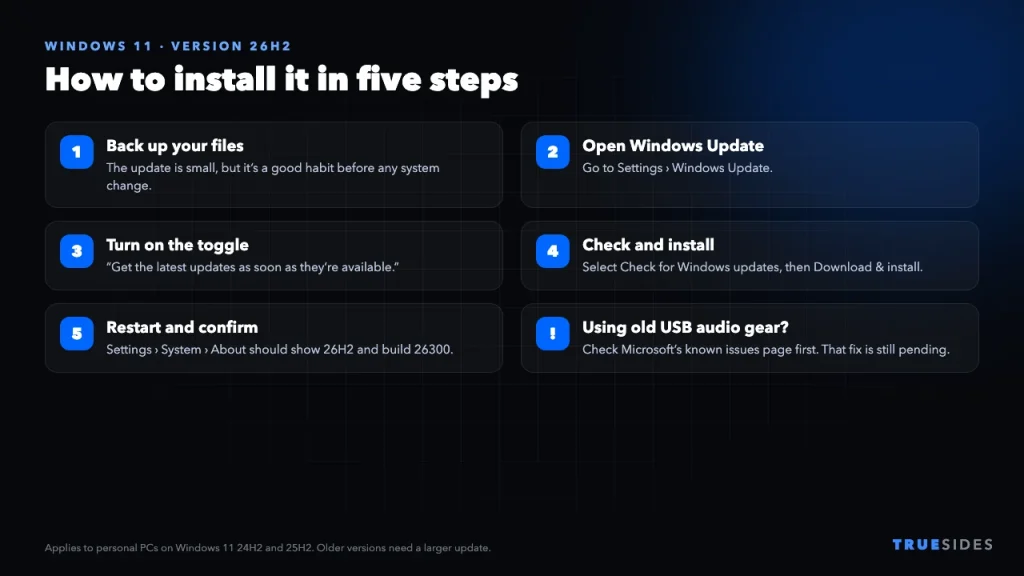
- Open Settings > Windows Update.
- Turn on Get the latest updates as soon as they’re available if you want it right away.
- Select Check for Windows updates.
- If 26H2 is listed for your PC, select Download & install.
- Restart when asked, then confirm the version in Settings > System > About. It should show version 26H2 and a build starting with 26300.
Those steps are from Microsoft. Windows Latest notes that if you’ve turned on the “latest updates” toggle, 26H2 may download and install automatically. It also speculates that Microsoft could start pushing the update to more PCs automatically before long, though we haven’t seen Microsoft announce a date.
What if you’re on an older version?
|
Your PC is on… |
What to expect |
|
Windows 11 25H2 or 24H2 |
Small enablement package and one restart |
|
Windows 11 23H2 or older |
A full feature update, which takes longer |
|
Windows 11 26H1 |
Not offered. It uses a different platform on newer Snapdragon X2 and RTX Spark PCs |
|
Windows 10 |
You’d first need a PC that qualifies for Windows 11 |
Still on Windows 10? Our guide to Windows 10 end of support explains your options.
Windows 11 26H2 Not Showing Up? Check These
- You may already have it. Go to Settings > System > About and look under Windows specifications. If it says 26H2, you’re done.
- Your PC may have a safeguard hold. Microsoft can pause the offer on devices with a known compatibility problem. According to Windows Latest, this should only apply to PCs on 23H2 or older.
- Your PC may be on 26H1. As mentioned above, those PCs won’t be offered this update.
- Your PC may be managed. Work and school devices can have updates controlled by an administrator.
If a hold is the reason, don’t try to get around it with an ISO. The hold exists because Microsoft has spotted a possible problem on your hardware or software. Wait for it to clear unless you have a good reason and a full backup.
What’s New in Windows 11 26H2?
Don’t expect a dramatic change the moment you restart. Microsoft says many features have been reaching supported PCs through monthly updates over the past year, and Windows Central notes that 26H2 shares its feature set with versions 25H2 and 24H2 apart from small changes. Some of what’s below may arrive gradually, or depend on your PC and region.
- Longer support. This is the most practical benefit. Microsoft lists support for Home and Pro until October 10, 2028, and for Enterprise and Education until October 9, 2029.
- A movable taskbar. Pureinfotech reports you can move it to the top, left, or right from Settings > Personalization > Taskbar > Taskbar behaviors, along with a new smaller size. Rollout may vary.
- Better performance on 8GB PCs. Microsoft says you’ll need version 26H2, build 26300.9818 or later, to get its latest memory improvements.
If your PC already feels slow, that last point may be the best reason to update. Our guide to fixing a slow computer covers other things to try.
Should You Update Now?
Update now if…
- You’re on Windows 11 24H2 or 25H2 and have a personal PC.
- You want the longest support window and the latest memory improvements.
- You don’t rely on an older USB audio device.
Wait a little if…
- You rely on an older USB audio device for work or music.
- You’re in the middle of an important project and can’t risk any downtime today.
- You’re on 23H2 or older and haven’t made a backup yet.
Final Thoughts
For most home users, Windows 11 26H2 is a low-risk update. On 24H2 and 25H2 it installs quickly with one restart, and four of Microsoft’s five listed issues are now resolved. You probably won’t notice much that’s new right away, but you do get a longer support window and access to Microsoft’s latest performance work. Back up your files, check Windows Update, and it should be done in minutes.